Restore a purchase
Get your Personal plan back after a reinstall or a new device, and sort out a subscription that is linked to a different account.
Your Personal subscription is bought through Google Play and tied to your GBpass account. Occasionally the two lose track of each other, and the app shows the Free plan even though you are still paying. Restore purchases asks Google Play what you actually own and reconnects it to your account. Nothing is charged again, and none of your vault data is touched.
1. When you need this
Try Restore purchases when you are paying for Personal but the app does not show it:
- smartphoneYou reinstalled GBpass, or set it up on a new phone.
- swap_horizYou restored your phone from a backup and your plan came back as Free.
- check_circleGoogle Play charged you, but the plan never activated in the app.
If your plan simply ran out, this is not the right tool. A lapsed subscription moves your account to the Free plan, and you get Personal back by renewing. See Manage your plan & billing for that.
2. Tap Restore purchases
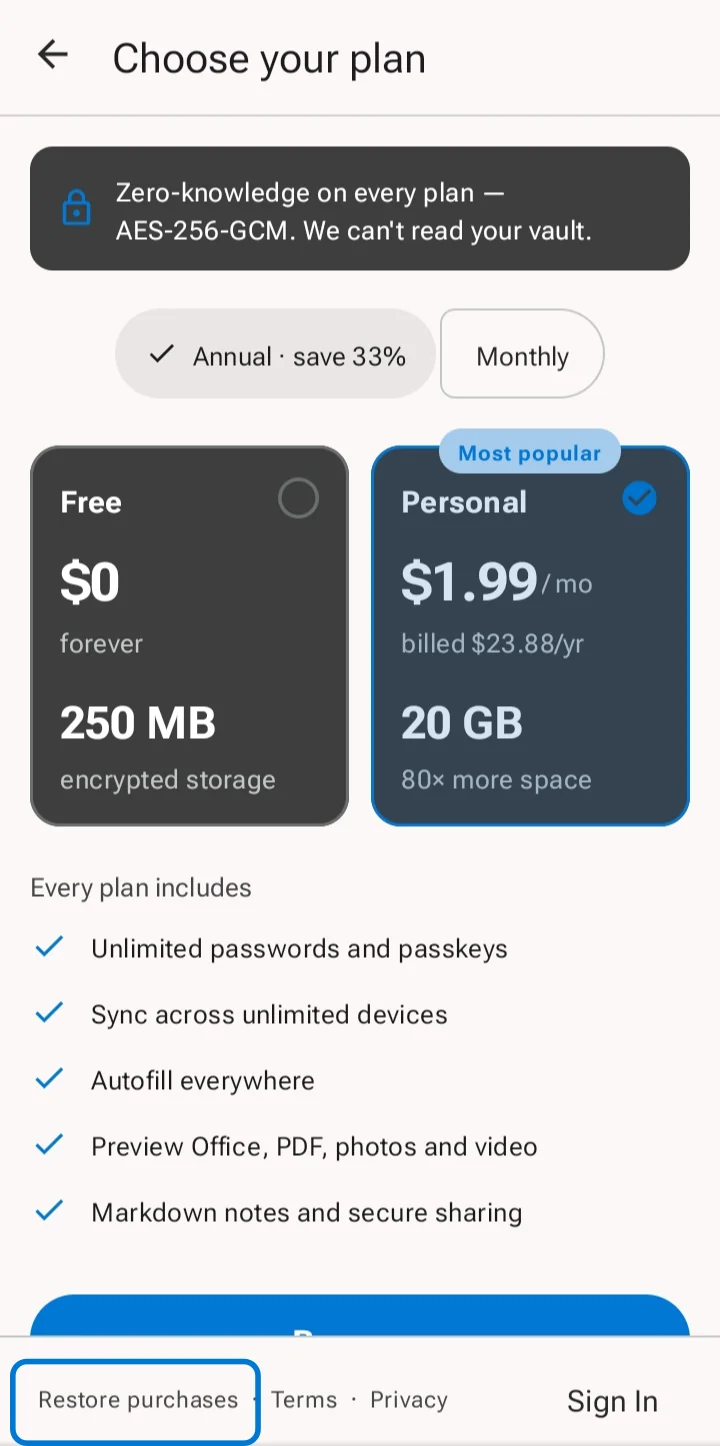
Open Settings, tap Plan, and look at the bottom of the plan screen. Restore purchases sits there next to the Terms and Privacy links. Tap it once and wait a moment while GBpass checks with Google Play.
Before you tap, make sure your phone is signed in to Google Play with the same Google account that paid. A subscription bought on a different Google account cannot be found from this one.
3. What the result means
GBpass tells you exactly what it found. There are four possible answers, and they mean quite different things.
Your plan comes back
Google Play confirmed your subscription and GBpass relinked it to the account you are signed in to. Personal is active again, along with its 20 GB of storage. This is the usual outcome after a reinstall or a new phone.
"No previous purchase found on this Google account"
Google Play answered, and this Google account does not own a GBpass subscription. Check the Play Store is signed in to the account that paid, then try again. If you never subscribed, there is nothing to restore, and the Free plan keeps working for as long as you want.
"Google Play is unavailable right now"
warning This is not the same as owning nothing. GBpass could not reach Google Play at all, so it does not yet know what you own. Check your connection and try again in a minute. Your subscription is unaffected.
"This subscription is already linked to..."
The subscription is real, but it belongs to a different GBpass account. The message names that account, so sign out and sign back in with the email address it shows. See section 4 below.
4. A subscription linked to another account
One Google Play subscription pays for one GBpass account. If you created a second GBpass account, perhaps with a different email address, the subscription stays with the first one. Restoring from the second account will not move it across.
Sign in with the email address named in the message and your plan will be there. If you would rather use the newer account, cancel the old subscription in Google Play first, then subscribe again from the account you want to keep.
You may instead see Subscription Not Recognized. That means Google Play knows about the purchase but our server has no record of it. Open Manage Subscriptions to review it in Google Play, then get in touch so we can look it up for you.
5. If the free trial button is missing
The 30-day free trial can be used once per Google account. If you have had it before, the trial button is replaced with a note saying your Google account has already used it, and you can still subscribe at the normal price.
error Trial eligibility belongs to your Google account, not to your GBpass account. Cancelling, resubscribing, reinstalling the app or making a new GBpass account will not give you a second trial.
6. Still not sorted?
If Restore purchases did not bring your plan back, have your Google Play order number ready and contact our team. Whatever happens with billing, your vault stays encrypted and readable, so nothing is at risk while we sort it out. You can also check the help FAQ or the refund policy.
Related articles
Still need a hand?
Browse the Help Center FAQ or contact our support team.