

Manage & revoke access
See who has access to a shared item and revoke any person or share link whenever you need to.
Sharing an item is only half the job. Once other people can see a login or note, you may need to check who still has access and cut it off the moment someone no longer needs it. GBpass keeps this in one place so you always know exactly who can open a shared item and can revoke that access in a couple of taps.
Open Manage access
Everything starts from the item you shared. Open the item, then open its menu and choose Manage access.
- checkTap the item in your Vault to open it.
- checkOpen the item's menu and choose Manage access.
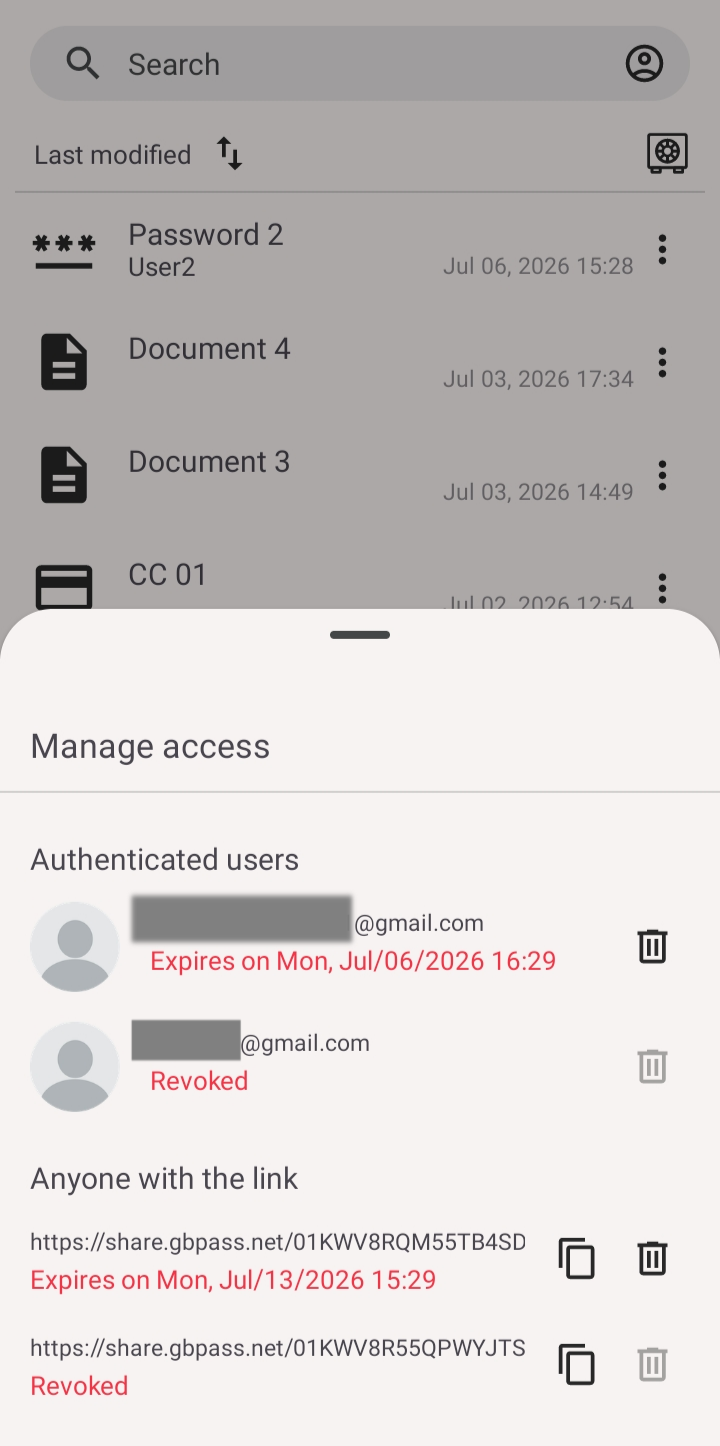
- checkThe Manage access sheet opens with everyone and everything that can currently reach the item.
See who has access
The sheet is split into two clear groups so you can tell people and links apart at a glance.
- groupPeople with access lists the email addresses you shared the item with.
- linkAny active share links you created for the item appear below the people.
If you have not shared this item yet, or want to add someone new, start from Share items.
Revoke access
You can remove any person or any share link at any time. Next to the person or link you want to remove, tap Revoke. GBpass asks you to confirm with Revoke this share? so you never cut off access by accident. Confirm, and you'll see Access revoked.
warning Revoking a share link is instant: anyone still holding that link will no longer be able to open the item. If a password may have already been seen, change it as an extra precaution.
When to revoke
Make revoking part of your routine so access never lingers longer than it should.
- swap_horizA teammate, family member, or contractor no longer needs the item.
- linkA share link has served its purpose and you want to close it off.
- shield_lockYou want to tidy up access during a regular security check.
For more on how GBpass protects your shared items end to end, see the security overview.
Related articles
Still need a hand?
Browse the Help Center FAQ or contact our support team.