

Save & use a passkey
Save a passkey to GBpass from a supported website, then sign in with it using your fingerprint or device unlock.
Passkeys let you sign in to supported websites and apps with just your fingerprint or device unlock, no password to type or remember. GBpass can store your passkeys in your encrypted vault so they sync and stay backed up alongside your logins. This guide walks through saving a new passkey and using one to sign in. If you are new to the idea, start with Passkeys overview.
What you need first
Passkey support relies on your phone's system credential manager, so a couple of things need to be in place before GBpass can save or offer a passkey.
- smartphoneAndroid 14 or newer.
- passkeyGBpass set as a credential provider on your device. Android asks you to choose one the first time a site offers a passkey, and you can change it later under Android's Passwords & accounts settings.
- fingerprintA screen lock (fingerprint, PIN, or pattern) enabled, since every passkey action is confirmed with your device unlock.
1. Save a passkey to GBpass
When a supported website or app offers to create a passkey, Android shows a system prompt asking where to store it. Choose Save passkey to GBpass, then confirm with your fingerprint or device unlock. GBpass creates the passkey and files it in your vault automatically.
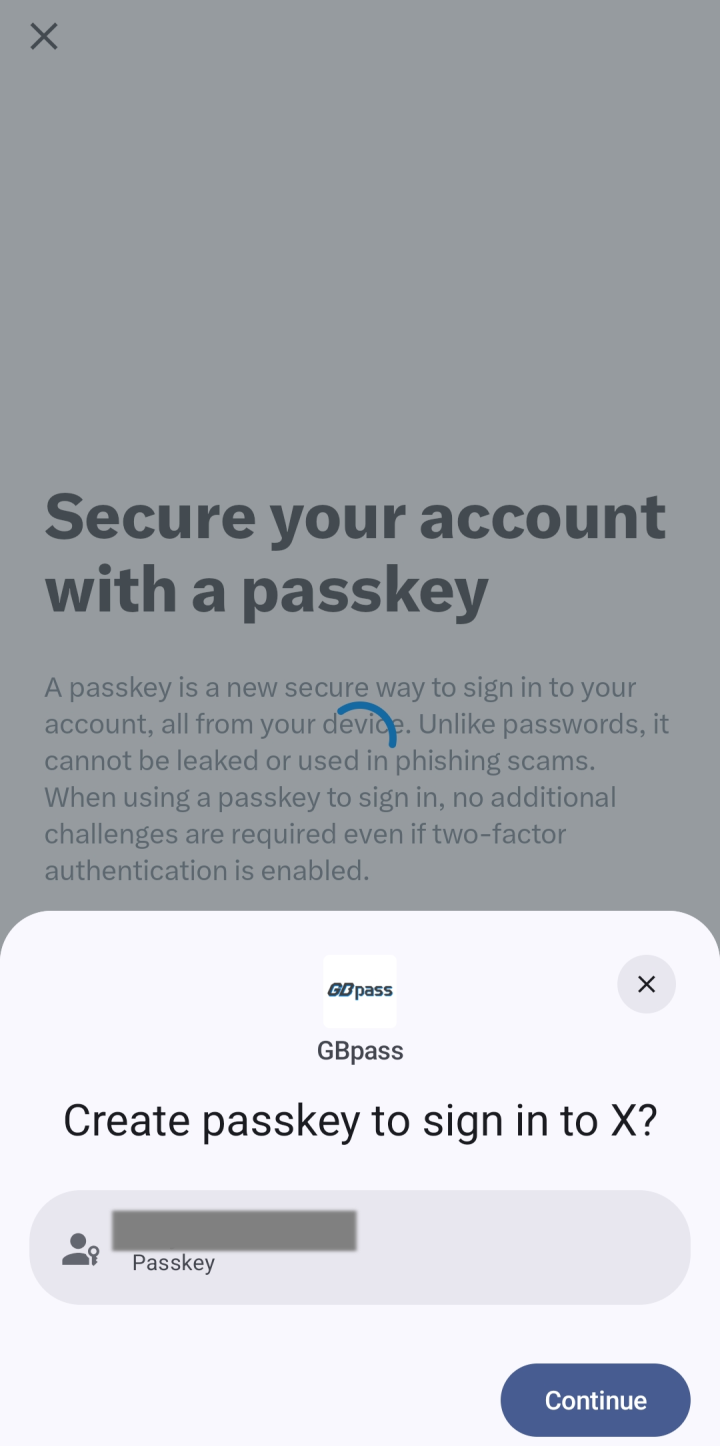
If a passkey for that account already exists, GBpass lets you know so you do not create a duplicate. In that case you can keep the one you have and simply use it to sign in.
2. Use a passkey to sign in
On the site's sign-in screen, choose Use passkey from GBpass and confirm with your biometrics. There is no password to enter, GBpass hands the passkey to the site and you are signed in.
If a passkey will not save
Passkeys work on every plan. There is nothing to unlock or upgrade.
warning If GBpass will not save a new passkey, check that GBpass is still selected as your credential provider in Android settings, and that the site actually offers passkeys rather than a password. Existing passkeys keep working either way.
Related articles
Still need a hand?
Browse the Help Center FAQ or contact our support team.